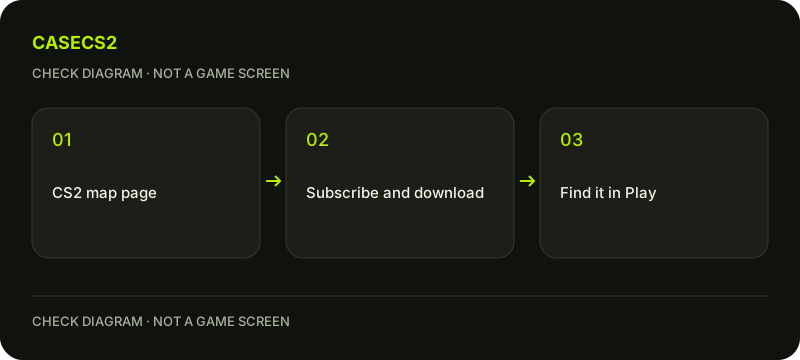
Subscribe to a CS2 Workshop map and find it in the game
Choose a compatible map in the official CS2 Workshop, subscribe and allow its download to finish before looking for it through the game’s Play menu. A subscription is not an endorsement, a skin entitlement or a guarantee that an older CS:GO map works in CS2. Playing a map does not require installing creator tools.
CASECS2Updated:
Check the item type before subscribing
Page or action
What it means
What it does not mean
A CS2 map page
A community map to inspect
Every old map is compatible
Subscribe
Request the item through Workshop
Download and loading are already complete
Workshop creator tools
Tools for creating content
Required merely to play a map
For example, a weapon-finish submission and a playable map are different item types. Confirm the title, description and compatibility before acting. The item-type guide illustrates why an attractive image alone is not enough to identify what an entry actually provides.
A check diagram, not a game screen.
Use the official Workshop context
Start with the official Workshop associated with Counter-Strike 2, app 730. Read the author’s description and update information for the chosen map. Check that its instructions concern CS2 rather than an old CS:GO release with a similar name.
Valve’s November 2023 Maps Workshop announcement explains the subscription-to-Play route, but it is a dated feature announcement, not a live endorsement of every current upload. Use the official-update review method to distinguish that feature history from the present compatibility of one community item.
Subscribe and wait for the download
Use Subscribe on the selected Workshop page, then inspect Steam’s download state. Do not assume that seeing the subscription button change means every file has finished downloading. Wait for the relevant download before starting the in-game availability test.
Avoid installing a third-party loader or executing a downloaded program merely because a comment calls it a requirement. This walkthrough does not supply a guessed map identifier, launch flag or server command; the documented route uses the Workshop subscription and the game’s own menu.
Find the map through the Play menu
Launch the current CS2 client and use the Workshop-related category in Play to find the downloaded map. Match the function and selected map rather than relying on exact coordinates from an old screenshot. Valve’s announcement describes trying Workshop maps offline through this route.
Keep the test separate from ranked matchmaking or reward progress. There is no general rule that all community maps award XP, medals or skins. The Prime and progression guide covers account eligibility separately; subscribing to a map does not create an entitlement or fulfill another mode’s conditions.
If it is missing, check each stage
Record whether the item is subscribed, whether its download completed and what the game currently lists. A missing map can concern those stages or the item’s compatibility. Do not jump directly from “not visible” to “my whole installation is broken.”
Read the author’s current description for a compatibility issue. If the base game also shows a genuine installation symptom, the file verification guide is a separate targeted check. Verification does not promise to convert incompatible community content into a working CS2 map or finish an unfinished author update.
Keep evidence specific to your chosen map
After loading, verify that the map matches the page you selected. If you save a comparison image, follow the Steam screenshot guide and avoid including private account notifications. Note the map title, observation date and relevant author update information.
A working local map test is not a public recommendation or proof that the same map works in every configuration. Likewise, subscribing is not publishing your own content. Preserve the result as a check of this chosen item and continue through ordinary game controls without installing creator tooling solely for a play session.
Sources checked on 2 November 2026. Menu locations and labels may vary with the client version and language; check your own current state before changing it.
Help
Questions and answers
What you should know before you begin.
Do I need Workshop Tools just to play?
The documented play route uses a map subscription and the game’s Play menu; creator tools are not required merely for that task.
Does Subscribe mean the download is finished?
No. Check Steam’s download state before testing availability inside CS2.
Will every Workshop map award XP or skins?
No such blanket reward guarantee follows from a Workshop subscription or custom-map session.