CS2 weekly care package: eligibility and missing-reward checks
A CS2 weekly care package depends on the game’s eligibility rules, including Prime status and the eligible weekly profile rank-up. It is not a reward for registering on CaseCS2 or increasing your Premier rating. Start by checking Prime and the profile XP progression shown by CS2, then inspect the current reward-selection interface.
CASECS2Updated:
Separate the progression systems first
A competitive match can show several numbers, but they do not all control the care package. Read the label beside the progression you are checking rather than calling every number a level or rank.
What you see
Relevant check
Do not confuse it with
Prime status
Eligibility under the Steam FAQ
Registration on another website
Profile XP and profile rank
Eligible weekly rank-up
Premier competitive rating
In-game reward selection
Offer for your account
Historical lists from a guide
CaseCS2 balance or bonus
Separate website feature
CS2 weekly entitlement
The item-types guide helps identify an offered item without treating every reward as a weapon finish.
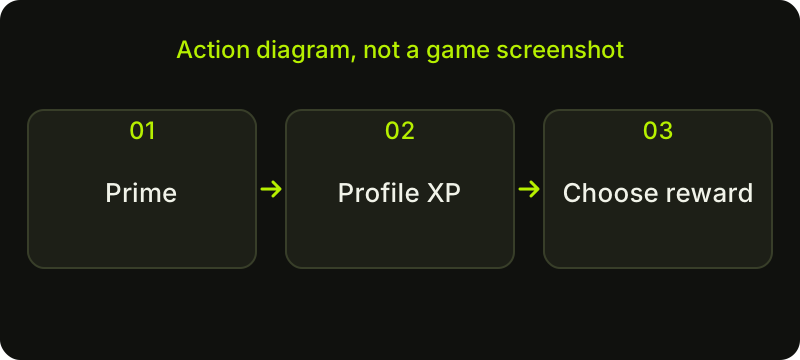
Check sequence: a diagram, not a game screenshot.
Check the account’s Prime status
Open the relevant account and game information to confirm Prime. The official Steam FAQ states that non-Prime accounts do not earn XP or weekly care packages. Playing more without checking that prerequisite can leave you investigating the wrong issue.
Prime belongs to the CS2 account’s status. A CaseCS2 login, referral invitation or push-notification bonus does not grant it. Keep the Steam account you are checking consistent throughout the process, especially if you use more than one on a computer. No activity on a separate website replaces the game’s eligibility requirement. You can investigate these settings yourself through the game and official account information.
Follow profile XP rather than Premier rating
Look at profile progression and the game’s indication of current eligibility. The care-package question concerns the first eligible weekly profile rank-up, not simply finishing a match or watching a competitive rating change. A Premier rating increase is not a substitute for that check.
Do not calculate an exact number of minutes you must play from another person’s experience. Your starting XP position, current rules and what you have already claimed matter to the diagnosis. This article does not assign a universal reset hour or timezone. Read the current game indication and official information if a schedule detail is important to your situation.
Read the offered selection before confirming
When CS2 presents the care package, review the choices actually shown to your account. Identify each item type and read its name. Do not replace that selection with an old screenshot, a fixed case list or somebody else’s reward video.
For a deliberate choice, note which option you would enjoy using and which you already have. Compare information you can verify without turning the selection into an assumed income calculation. The offer pool, market conditions and individual preferences can change. A guide naming a supposedly guaranteed valuable case is not evidence of what your package will contain. Confirm only after you understand the current offered choices.
Work through a missing-package checklist
Check one uncertainty at a time:
Confirm the Steam account and Prime status.
Check profile XP and rank, keeping competitive rating separate.
Review whether the relevant weekly package has already been selected.
Read the current eligibility or reward notice, including an inventory-capacity message.
If the display remains unclear, record what the game says and use the official support route.
Valve’s June 2026 notes describe a specific message when a full inventory blocks redemption. Treat that notice as an inventory-space issue, not proof that eligibility vanished. Avoid deleting items hastily. The support-evidence guide helps prepare a useful record without publishing secrets.
Keep receipt and later inventory actions separate
After a confirmed selection, inspect the game or Steam inventory to identify the received item. Later use, trade eligibility or market availability is another question. Receiving an item does not erase a restriction shown on its card. The tradable versus marketable guide explains why those permissions should be read separately.
Also distinguish an item received in CS2 from a record or action on CaseCS2 with the inventory-status guide. Finish with the actual selection and present item information. There is no need to invent drop odds, chase a particular reward or treat deposits elsewhere as a route to the weekly package.
Sources checked on 2 November 2026. Historical announcements explain the introduced mechanics; check the current CS2 and Steam interface for available actions and your item’s status.
Help
Questions and answers
What you should know before you begin.
Do non-Prime accounts get a weekly care package?
The cited Steam FAQ says non-Prime accounts do not earn XP or weekly care packages. Check your own Prime status before troubleshooting further.
Does increasing Premier rating unlock the package?
Premier rating is not the profile XP progression used for the eligible weekly rank-up. Check those systems separately.
What time does the weekly package reset?
This guide does not give an unverified universal hour. Follow the current game’s eligibility indication and official information for schedule details.